
What is Free Image Cropper?
Free Image Cropper is an online image cropper that cuts a photo to the exact shape a website, form or print asks for: square, circle, 4:5 portrait, 16:9, a 35 × 45 passport photo, any custom ratio, or an exact size in pixels. You can rotate and flip the picture before you crop, and save the result as PNG, JPG or WebP. While you drag, a live readout shows the exact pixel size of your selection, so you know what you'll get before you save.
It runs in your browser, so the photo never leaves your device, and there's no signup or watermark. It's one of six free tools on Free Image Scaler. Below, a real example shows what cropping does to a photo, followed by the right shape for each common use.
What this image cropper does, in one real example
This free image cropper cuts a photo down to the part you want and the shape you need: a square for a profile picture, 4:5 for an Instagram post, 16:9 for a YouTube thumbnail, 35 × 45 mm proportions for a passport photo, a circle for an avatar, any ratio you type in yourself, or an exact size in pixels such as 1080 × 1350. It runs in your browser, so the photo never leaves your device, and there is no account, watermark or limit.
Here is what a crop actually does to a file, measured rather than promised. We took a 3264 × 2448 photo of a cat (an 8 MP phone photo, 4.15 MB as a JPG) and cropped it to a square. The result was 2203 × 2203 pixels: every pixel in that square is an original pixel from the photo, not an enlarged or shrunk copy. Saved as JPG it weighed 1.52 MB, as WebP 1.29 MB, and as PNG a surprising 10.08 MB, more than twice the size of the full original. The whole crop, including saving the file, took about a second.
That last number is the kind of thing nobody tells you, and it matters when an upload form has a size limit. This page explains how to crop well, which ratio to pick for each platform, how to hit an exact pixel size, what happens to quality and file size, and where cropping stops being the right tool.
How to crop an image
- Add your photo. Drag a JPG, PNG or WebP onto the upload area, or click it to pick a file. On a phone, tapping it opens your photo library.
- Choose a shape. Pick one of the nine presets, or type your own ratio into the Custom ratio boxes (for example 50 : 70 for a Canadian passport photo) and press Apply. Free lets you drag the box to any shape.
- Frame the crop. Drag the crop box to move it, and drag its corners or edges to resize it. If the photo is too small on screen to frame precisely, zoom in with the slider, the mouse wheel or a pinch; the photo stays centred while you zoom, and you can then drag it to pan.
- Watch the size readout. Under the photo, "Selection" shows the size of your crop in real pixels of the original photo, updated as you drag. This is how you make sure a crop is at least 1080 pixels wide for Instagram, or between 600 and 1200 pixels for a US passport photo.
- Rotate or flip if needed. The rotate buttons turn the photo 90 degrees at a time. Flip H mirrors it left to right, Flip V top to bottom.
- Pick a format and crop. Choose PNG, JPG or WebP (more on which below), then press Crop Image. The result appears on the right with its pixel size and file size.
- Download. The file is saved with "-cropped" added to its original name. If you don't like it, adjust the box and press Crop Image again; nothing is final until you download.
The crop box starts at 90 percent of the photo in each direction, which is a sensible starting point for a light trim. Reset puts everything back to that starting point, including rotation and zoom.
Does cropping reduce image quality?
Short answer: the pixels you keep are untouched, but the file is saved again, and how much that matters depends on the format you choose.
Cropping itself does not blur anything. Unlike resizing, which has to invent or merge pixels, a crop just throws away everything outside the box. The tool exports the selection at its native size: crop a 2203-pixel-wide area and you get a 2203-pixel-wide image. Nothing is scaled up or down behind your back. If you need the result smaller, for example exactly 1080 × 1080, the platform you upload to will usually scale it for you, or you can do it with the size options in the image compressor.
What does change is the encoding. A JPG or WebP is compressed with some loss, and the cropped file is compressed again at quality 92 out of 100. That is a high setting: you will not see a difference at normal viewing size, even zoomed in on a phone. But each JPG save adds a little loss, so if you plan to edit the photo further, crop as the last step, or export PNG for the in-between steps.
The file size surprise
People expect a cropped photo to be smaller. Often it is, but not always, and the reason is worth knowing.
In our tests, the cat photo went from 4.15 MB to 1.52 MB after cropping away about 40 percent of its pixels, which is what you'd expect. Then we cropped a portrait that had been heavily compressed by the site it came from: 3746 × 3746 pixels in only 419 KB. We cut it down to 2622 × 3371 for a passport-style crop, removing 37 percent of the pixels, and the JPG came out at 414 KB, almost exactly the same size. The original had been saved at low quality; our crop was saved at quality 92, which keeps more detail and therefore costs more bytes per pixel. Fewer pixels, more bytes for each one, roughly the same file.
This only matters when a form has a hard limit. If your cropped file is over it, run it through the compressor, which lets you set a target size in KB. Our guides on how to compress an image to 100 KB and down to 50 KB walk through what quality to expect at each size.
PNG, JPG or WebP: which format to export
- JPG is the safe choice for photos. Every website, form, printer and phone accepts it, and the file stays reasonable: 1.52 MB for our 4.9-megapixel square crop. JPG has no transparency; if your image has see-through areas (a logo, or a product photo with the background removed), they are filled with white when you export to JPG.
- WebP made the smallest file in our test (1.29 MB for the same crop, about 15 percent less than JPG) at the same quality setting, and it keeps transparency. Modern browsers and most social networks accept it. Some older software, print shops and government upload portals do not, so check before you send one.
- PNG is lossless, so nothing is lost on export. That is ideal for screenshots, graphics, logos and anything with transparency, but for photos it is heavy: our square crop was 10.08 MB as PNG against 1.52 MB as JPG. Use PNG for a photo only when you will keep editing it, or when a print shop specifically asks for a lossless file.
One thing all three formats have in common: the exported file contains no camera metadata. We checked every output from our tests and none of them carried EXIF data or GPS coordinates. The crop is drawn fresh and saved as a new image, so date, camera model and location are left behind. That's a pleasant side effect, but if removing location data is your actual goal, use the metadata remover instead: it removes everything without saving the image again, so there is no quality cost at all, and it shows you what was there.
Which aspect ratio to choose
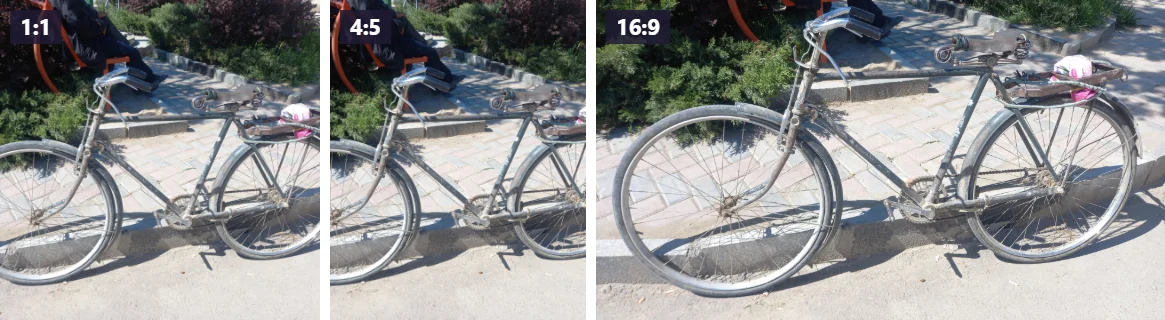
An aspect ratio is just width compared to height. 1:1 is a square; 16:9 is a widescreen TV shape; 4:5 is a slightly tall rectangle. Platforms fix a ratio for each slot, and when your image doesn't match, they crop it for you, usually from the centre and usually not where you would have. Cropping it yourself first means you choose what stays.
Each preset in the tool, what it is for, and the size to aim for:
- Square 1:1. Profile pictures almost everywhere, marketplace thumbnails, product images on many online stores, and square Instagram posts. For a profile picture, 400 × 400 pixels or more is plenty; for a post, aim for at least 1080 × 1080.
- Portrait 4:5. The tallest shape Instagram shows in full in the feed, and the most widely recommended size for feed posts: 1080 × 1350 pixels. A taller post takes up more of the screen as people scroll, which is why so many accounts use it.
- Photo 3:4. Since 2025, Instagram's profile grid shows each post as a 3:4 thumbnail, and it accepts 3:4 posts at 1080 × 1440. It is also the classic shape of phone photos held upright, and of many document photos (the Brazilian "3x4" photo and the 30 × 40 mm Japanese résumé photo are both exactly 3:4).
- Landscape 1.91:1. The shape of link previews on Facebook, LinkedIn and many chat apps, usually 1200 × 630 pixels, and of landscape Instagram posts (1080 × 566).
- Widescreen 16:9. YouTube thumbnails, video covers, presentation slides and desktop wallpapers. YouTube currently recommends 3840 × 2160 pixels for a thumbnail with a minimum width of 640; in practice 1280 × 720 still looks sharp in every place a thumbnail appears.
- Photo 3:2. The native shape of most DSLR and mirrorless cameras, and of a 4 × 6 inch or 10 × 15 cm print. Crop to 3:2 and a photo lab will not trim anything off.
- Passport 35×45. The 35 × 45 mm photo used for passports and ID cards across the EU, the UK and many other countries, a ratio of 7:9. More on passport photos below.
- Banner 2:1. Website headers, blog banners and email headers, where a wide strip sits above the content.
- Free. No fixed shape. Use it to trim edges, remove something at the side of a photo, or when you have no platform in mind.
When a size you need isn't on the list, type it into Custom ratio. You can enter it in any unit, as long as both numbers use the same one: 50 : 70 (millimetres), 5 : 7 (inches) and 1000 : 1400 (pixels) all give the same shape. The tool only cares about the proportion.
For the full list of current Instagram sizes, including Stories, Reels covers and what the grid crops off a 4:5 post, see our Instagram image size guide. YouTube thumbnail specifics, including the 2 MB limit on mobile uploads, are in the YouTube thumbnail size guide.
Crop to an exact size in pixels
A ratio fixes the shape, not the size. A 4:5 crop can be 400 × 500 pixels or 2400 × 3000; both are 4:5. Platforms and forms often care about both: Instagram wants 4:5 and at least 1080 pixels wide, and a US passport photo must be square and between 600 and 1200 pixels on each side.
When you need an exact size, type it into Exact size, for example 1080 × 1350, and press Set. The selection locks to that shape, you move it over the part you want, and the download comes out at exactly that many pixels. We tested 1080 × 1350 and 400 × 400 and got both to the pixel. If the area you select holds more pixels than that, it is scaled down cleanly; if it holds fewer, it is stretched up, which is where a soft result comes from.
The Selection readout under the photo shows the selected area in pixels of the original, so you can see which of these three situations you're in:
- The selection is comfortably bigger than you need. That's the normal case with phone photos. Crop to the exact size and upload. If a form also has a file size limit, run the result through the image compressor.
- The selection is a little too small. Make the box bigger if the framing allows. A tight crop of a face in a group photo often lands under 600 pixels; widening it by a hand's width can push it over.
- The selection is far too small. If you need 1080 pixels and your crop is 500, cropping can't help: there aren't enough pixels in that part of the photo. Crop first, then enlarge the result with the AI image upscaler, which adds detail instead of just stretching the pixels. Our guide on how to increase image resolution explains what to realistically expect from 2x and 4x.
Order matters here. Crop first, then upscale: the upscaler then works only on the part you keep, which is faster and lets you use a higher factor within the device's memory limit.
Passport and ID photos
A passport photo is the case where getting the crop exactly right matters most, because an automated check or a clerk will reject a photo that's even slightly off. The tool helps with the shape and the size; the rules about the photo itself are yours to check.
The common sizes:
- 35 × 45 mm (EU countries, the UK, India, Japan, South Korea and many others): use the Passport 35×45 preset.
- 2 × 2 inches (United States): use Square 1:1. For an online application, the digital file must be between 600 × 600 and 1200 × 1200 pixels, and a photo that is off by a single pixel (800 × 801) fails the automatic check. The readout tells you the size before you export.
- 50 × 70 mm (Canada): type 50 : 70 into Custom ratio.
- 33 × 48 mm (China): type 33 : 48.
We tested the 35×45 preset on a 3746 × 3746 portrait: the crop came out at 2622 × 3371 pixels, which is exactly 7:9, and a custom 50 : 70 crop of the same photo came out at 2408 × 3371, exactly 5:7. If you print at a photo shop, the proportion is what matters; the print size is set when you order.
The proportions are only half of it. Most passport rules also set how large the head must be in the frame (for a 35 × 45 mm photo, usually somewhere between 29 and 36 mm from chin to crown, depending on the country), how much space goes above the head, and that the face is centred. Frame the box so the head fills that share of the height, with the eyes roughly two thirds of the way up. Our passport photo size guide lists the rules country by country with the numbers to aim for.
What cropping can't fix: shadows, a patterned background, glasses glare or a tilted head. And be careful with editing beyond cropping. Many passport authorities, including the US State Department, do not allow photos that have been digitally altered, which can include replacing the background. Standing in front of a plain light wall and cropping the result is the safest route.
Cropping for print
Print sizes have ratios too, and a photo lab will trim whatever doesn't fit. Matching them before you order means you decide what gets cut:
- 4 × 6 in or 10 × 15 cm: 3:2 (the Photo 3:2 preset).
- 5 × 7 in: 5:7 (Custom ratio).
- 8 × 10 in: 4:5 (the Portrait 4:5 preset).
- A4 and other A sizes: about 1:1.414, so type 210 : 297.
- Square prints: 1:1.
Then check there are enough pixels. Prints look sharp at about 300 pixels per inch when held in your hand; a poster viewed from across a room gets away with 150. So a 4 × 6 print wants about 1800 × 1200 pixels, an 8 × 10 about 3000 × 2400. Our 2203-pixel-wide crop of the cat photo would print sharply up to about 7 inches wide. If your crop is short of pixels for the size you want, upscale it before ordering.
A few rules that make crops look better
Most crops are about getting rid of something, but a good crop also places what's left. A few habits make a visible difference:
- Don't centre everything. Placing the subject, or the horizon, about a third of the way in from an edge usually looks more natural than dead centre. Portraits are the exception: passport and profile photos should be centred.
- Leave room in the direction the subject faces. A person looking left needs more space on the left side of the frame. Cut it close on that side and the photo feels cramped.
- Avoid cutting at joints. When a crop goes through a person, cut mid-thigh or mid-upper-arm rather than exactly at the knee, elbow or wrist, which looks like an amputation.
- Watch the edges. Half a car, a stray elbow or a bright patch at the edge of the frame pulls the eye out of the photo. A slightly tighter crop often fixes it.
- Remember the platform's overlays. YouTube puts the video length in the bottom right corner of a thumbnail; Instagram's profile grid trims a thin strip from each side of a 4:5 post. Keep faces and text away from those areas.
Since the tool rotates in 90-degree steps, it can't straighten a horizon that's tilted by a couple of degrees. For that you need a photo editor with a straighten tool, including the built-in editors on iPhone and Android.
Circle crop for profile pictures and avatars
Most platforms store a profile picture as a square and then display it as a circle: WhatsApp, Instagram, LinkedIn, X, Google accounts, Teams and Zoom all do. For those, a square crop is all you need, framed with the circle in mind.
When you want the round image itself, for a website, a slide, an email signature or a sticker, choose Circle. The selection turns into a circle, and the download is a square image with the corners cut away: transparent as PNG or WebP, white as JPG, because JPG can't store transparency. In our test the corners came out fully transparent in the PNG and pure white in the JPG.
Either way, put the face in the middle and leave a little space above the head so the circle doesn't clip the hair. Keep the face fairly large: head and shoulders fill a small circle far better than a full-length photo, where you become a dot. Don't put anything important in the corners, since nobody will see it. A selection of 400 × 400 pixels or more is enough everywhere; platforms shrink it anyway.
Rotate and flip: fixing sideways photos and mirrored selfies
Phones usually save photos sideways and add a small tag telling apps to display them rotated. Some older software ignores the tag, so a photo that looks fine on your phone appears on its side after it's been sent around. The cropper reads the tag and shows the photo the right way up. We tested it with an iPhone photo stored sideways: it appeared upright in the tool, and the cropped file came out as an upright 2203 × 2937 portrait image, with the rotation applied to the pixels themselves. That means it now displays correctly everywhere, even in software that ignores rotation tags.
If a photo still appears sideways or upside down, use the rotate buttons. The photo is re-fitted to the frame after each turn, so the crop box always starts centred.
Flipping is for selfies. Front cameras often save a mirror image, which looks normal to you (it's what you see in a mirror) but reverses any text in the photo and parts your hair on the wrong side to everyone else. Flip H corrects it. Don't flip photos that show text, logos or a place people know, unless you want them reversed.
Product photos for online shops and marketplaces
Marketplaces reward consistency: a row of product photos with the same shape and the same amount of space around each item looks professional, a mix of shapes looks like a garage sale. A routine that works for most shops:
- Shoot the products against a plain background with some space around them.
- If the background is messy or the shop requires pure white, remove it first with the background remover and export it on white. Our guide to a white background for product photos covers the exact white and framing that Amazon and similar marketplaces require.
- Crop every photo with Square 1:1 so the product fills roughly 85 percent of the frame. Keeping the same margin in every shot is what makes the set look consistent.
- Check that the Selection readout is at least 1000 pixels on the longest side. Amazon, for example, only enables zoom on images at least that large; if yours is smaller, run it through the upscaler.
- Export as JPG unless the shop accepts transparent PNG or WebP and you want transparency.
Crop after removing the background, not before. The background remover works better with a bit of context around the item, and cropping afterwards lets you set exactly the same margins on every product.
Cropping out personal details
Cropping is also the simplest privacy tool there is. Before you post a photo, look at its edges: a house number, a street sign, a car's number plate, a letter on the table, a child's school logo, or a reflection in a window can identify you as precisely as GPS data. Cropping them out removes them for good, since the pixels are not in the new file at all, unlike a blur or a sticker that can sometimes be partly undone.
As a side effect, the cropped file contains none of the original's metadata, as we confirmed above. But visible details and hidden data are two separate problems. If you share the photo uncropped, the metadata remover deals with the hidden part, and our guide on how to remove the location from a photo shows how to stop your phone adding it in the first place.
Cropping screenshots
Screenshots are the other thing people crop all day, usually to show one part of a screen: an error message, a chart, a few lines of a chat. Two tips make them better.
First, crop out the phone's status bar and anything around the part you mean. The status bar shows the time, your carrier and your battery level, and notifications at the top of the screen can show names and message previews you never meant to share. A crop removes them completely, which a scribble with a marker does not always do.
Second, think about the format differently than for photos. Screenshots are mostly flat colour and sharp text, and PNG keeps the letters perfectly crisp, without the faint smudges JPG leaves around them. The file-size penalty is small here: a 1080 × 600 crop of a text screen came to 77 KB as PNG, 58 KB as JPG and 34 KB as WebP in our test. PNG for crispness, WebP when it has to be small, and JPG only when a form accepts nothing else.
Troubleshooting
The crop box won't go smaller
The box has a minimum on-screen size of 48 pixels so its handles stay easy to grab. To crop a tiny area, zoom in first; the box can then cover a much smaller part of the photo.
Transparent areas turned white
JPG has no transparency, so see-through areas are filled with white when you export to JPG. To keep the transparency, choose PNG or WebP. (Many tools fill them with black instead; we fill with white because a white background is what product listings and documents expect.)
The downloaded file is bigger than the original
Either you exported a photo as PNG, or the original was saved at low JPG quality, as in our portrait test. Export as JPG or WebP, or compress the result.
The cropped image looks blurry
Cropping doesn't blur, but it does reveal. When you crop a small area and then view it at full screen, or a platform enlarges it, you see how few pixels that area really had. Check the Selection readout: a crop of 300 pixels across will look soft on any modern screen. Use a larger part of the photo if you can, or enlarge the crop with the AI upscaler.
My photo won't open
The tool accepts JPG, PNG and WebP. iPhone HEIC photos need converting to JPG first; on the iPhone itself, sharing a photo by email or AirDrop to a computer usually converts it, and Settings, Camera, Formats, Most Compatible makes the camera save JPG from then on. Very large photos can be slow or fail to open on phones with little memory; if that happens, try a computer.
The Selection numbers don't match the result exactly
The readout rounds to the nearest pixel while you drag, so the exported image can be one pixel different (2938 versus 2937 in one of our tests). When a size must be exact, check the "Cropped Size" shown under the result, which is the real size of the file.
If your problem isn't covered here, the troubleshooting page has fixes for every tool on the site.
How it compares to cropping on your phone or in an editor
The built-in photo editors on iPhone and Android crop well, have common ratios built in, and can straighten a tilted horizon, which this tool can't. Their limits are that they rarely show the crop in exact pixels, they don't have passport sizes, and the edit usually stays attached to the photo in your library, so what you send depends on how you share it.
Desktop editors like Photoshop, GIMP or Affinity Photo can do anything, including cropping to exact pixel dimensions in one step. They are the right tool if you're already editing in them. For a quick crop to a known shape they're a lot of program to open.
Windows Photos and macOS Preview both crop, and Preview shows the selection size. Neither has platform or passport presets, and Preview saves over the original unless you duplicate it first.
AI image croppers pick the frame for you. That's handy for a feed of thumbnails, but it can cut off a hand or a product label, and it can't follow passport rules. This image cropper doesn't guess: you choose the crop.
What makes the best free image cropper for web use is mostly unglamorous: exact pixel sizes, WebP export, no watermark and no upload. That's the list this one was built around, whether you use it as a square image cropper for a shop, a circle image cropper for avatars, or to crop by pixel for a form.
This tool is for the common job: a known shape, a quick check of the pixel size, a file in the format you need, and your original left untouched. It works the same on a phone and a computer, uploads nothing, and costs nothing.
Related tools and guides
- Need the crop bigger than the photo allows? Enlarge it with the AI image upscaler, and read how to increase image resolution without the usual blur.
- File too large for a form? The image compressor gets it under a size limit, and the guide to compress an image to 100 KB shows what quality to expect.
- Passport or visa photo? Check the passport photo size guide before you print or upload.
- Posting to social media? See the Instagram image size guide and the YouTube thumbnail size guide.
- Selling online? Pair the cropper with the background remover and follow the guide to a white background product photo.
- More on the blog: Blurry Product Photos Can Cost You a Sale: Here's What Fixes Them.