
Instagram Image Sizes
For an Instagram post, use 1080 × 1350 pixels (4:5 portrait). It takes up the most space in the feed and works everywhere. Square is 1080 × 1080, landscape 1080 × 566, and Stories and Reels are 1080 × 1920. Below: what Instagram does to photos outside those sizes, how much of a normal photo each shape keeps, and how to crop to them for free.
Instagram sizes at a glance
| Where | Shape | Size in pixels | Cropper setting |
|---|---|---|---|
| Feed post, portrait | 4:5 | 1080 × 1350 | Portrait 4:5 |
| Feed post, square | 1:1 | 1080 × 1080 | Square 1:1 |
| Feed post, landscape | 1.91:1 | 1080 × 566 | Landscape 1.91:1 |
| Feed post, tall (newer) | 3:4 | 1080 × 1440 | Photo 3:4 |
| Stories and Reels | 9:16 | 1080 × 1920 | Custom ratio 9 : 16 |
| Profile picture | 1:1, shown as a circle | at least 320 × 320 | Square 1:1 |
The width is 1080 pixels in almost every case. That's the width Instagram's help centre gives as the maximum it keeps: wider photos are scaled down to 1080, narrower ones (down to 320 pixels) are kept as they are, and anything smaller is enlarged to 320. Uploading more than 1080 pixels doesn't make the post sharper. Uploading much less makes it softer.
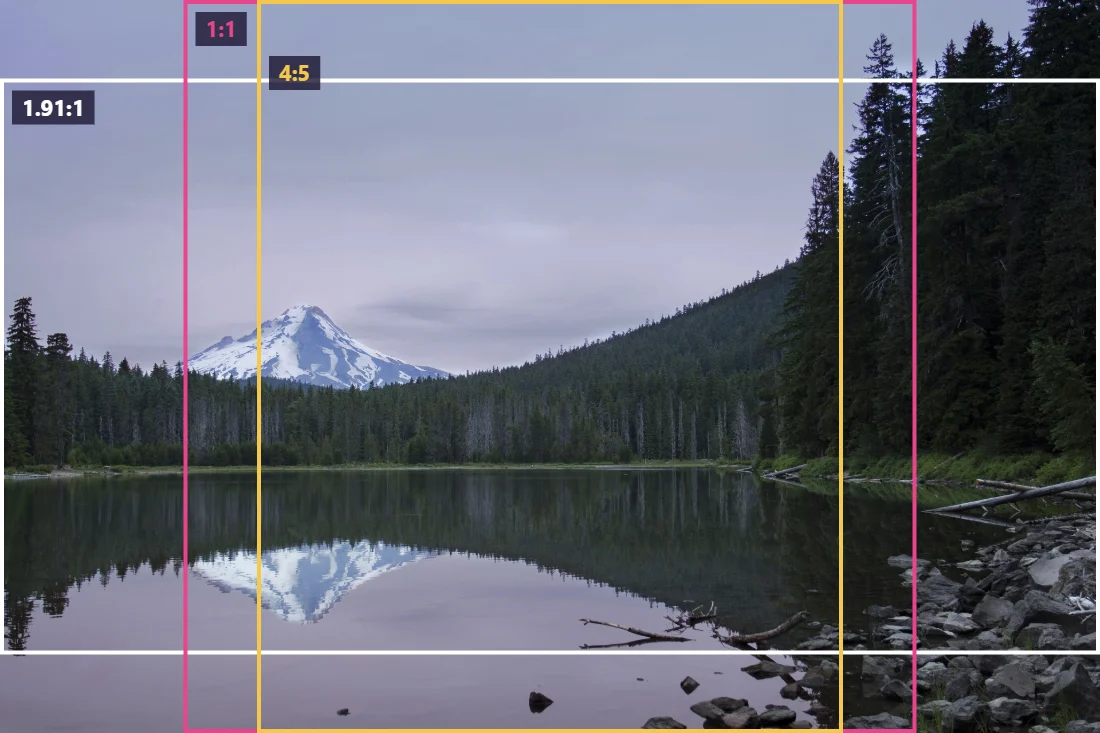
For feed posts, the same help centre text says shapes between 1.91:1 and 4:5 are kept; anything wider or taller is cropped to fit. In 2025 Instagram also started showing the profile grid in 3:4 and accepting 3:4 photos, which is why some guides now list 1080 × 1440. 4:5 is still the safe choice: it's supported everywhere, including by scheduling tools, and it shows at full size in the feed.
Which shape to choose
On a phone, the feed is a tall column. A portrait post fills more of it than a square, and a square fills more than a landscape. That's the whole argument for 4:5: people see more of your photo while they scroll, without tapping.
The catch is what you lose from a normal photo. We cropped two landscape photos, a coffee mug and a dog outdoors, to each Instagram shape and measured how much of the original width survived:
- Square: 62 to 68% of the width.
- Portrait 4:5: only 50 to 55%. Roughly half the picture is gone.
- Tall 3:4: 47 to 51%.
- Story, 9:16: 35 to 38%. About a third.
So the best advice is to decide before you take the picture. If a photo is meant for Instagram, hold the phone upright. A 12-megapixel phone photo taken upright is 3024 × 4032 (3:4), and cropping it to 4:5 keeps the full width and almost 94% of the height. The same photo taken sideways keeps only 60% of its width at 4:5.
Landscape photos that can't lose their sides, such as a group shot or a wide view, are better posted as 1.91:1 landscape or square than squeezed into 4:5. Or post them as a carousel of crops.
The 3:4 profile grid
Your profile page now shows posts as 3:4 rectangles rather than squares. The post itself isn't changed; only the thumbnail in the grid is cropped. The effect depends on the post's shape:
- A 4:5 post loses about 3% of its width at each side in the grid. Barely noticeable.
- A square post loses 12.5% at each side. Text or faces near the edges get cut.
- A landscape post loses much more, and shows as a narrow slice of the middle.
If your grid matters to you, for a shop, a portfolio or a brand, keep the important part of every post in the central three-quarters of its width.
Stories and Reels: the 9:16 canvas
Stories and Reels fill the whole phone screen at 1080 × 1920. The screen isn't all yours, though: the profile name and close button sit at the top, and the reply bar, caption and buttons sit at the bottom and along the right edge of Reels. Guides disagree about the exact pixel margins, and the layout changes between app versions, so keep text, faces and logos well inside the frame and check the preview before you post.
A landscape photo in a Story keeps only about a third of its width if you crop it to fill the screen. The alternatives are to place it smaller on a coloured background inside the Story editor, or to crop a tall slice that works on its own.
To crop a photo to 9:16 here, open the image cropper, type 9 and 16 into the custom ratio boxes and press Apply.
How to crop and resize for Instagram
- Open the image cropper and add your photo. It stays in your browser.
- Choose the shape: Portrait 4:5, Square 1:1, Landscape 1.91:1, Photo 3:4, or the custom ratio 9 : 16 for Stories.
- Move the frame over the part you want. The "Selection" readout under the photo shows the pixel size; it should be at least 1080 pixels wide.
- Download the crop as JPG.
- Open the image compressor, type 1080 into the width box, keep quality high (85 to 92) and download. The height follows automatically: 1350 for a 4:5 crop, 1080 for a square, 1920 for a Story.
In our tests, a 4:5 post at 1080 × 1350 came to 239 to 307 KB as a JPG at 92% quality, and a full Story at 1080 × 1920 to 360 to 393 KB. Small enough to upload quickly, large enough that Instagram's own compression has something good to work with.
If your photo is smaller than 1080 pixels wide after cropping, enlarge it first with the image upscaler. The guide on how to increase image resolution explains when that's worth it.
Getting the best quality out of Instagram
Instagram re-compresses every photo you post. You can't stop that, but you can give it less to do:
- Upload exactly 1080 pixels wide. A 4000-pixel photo has to be shrunk by Instagram's own resizer; a 1080-pixel one doesn't.
- Turn on high-quality uploads. In the app's settings, under data usage and media quality, there's an option to upload at the highest quality. Without it, the app may reduce quality on mobile data.
- Don't over-sharpen. Instagram's compression exaggerates sharpening halos. Slight is enough.
- Avoid tiny text. Text that's readable on your computer may be unreadable on a phone after compression. As a rule of thumb, nothing smaller than about 40 pixels tall on a 1080-pixel-wide image.
- Use JPG for photos, PNG for graphics. A flat graphic with text survives better as PNG; a photo is better as high-quality JPG.
Reel covers
A Reel's cover image is 9:16 like the video, but on your profile it appears in the 3:4 grid, which shows only the middle part of the cover's height. Put the title and the main subject in the centre of the cover, roughly the middle 70% of its height, and keep the top and bottom for background. If you design the cover yourself, make it 1080 × 1920 and check how it looks cropped to 3:4 before uploading; the Photo 3:4 preset in the cropper shows exactly which part will survive.
Common mistakes
- Posting a sideways photo as 4:5. Half the scene disappears. Use square or landscape, or reshoot upright.
- Uploading a screenshot of a photo. It's smaller and already compressed. Share the original file instead.
- Text at the edges. It gets cut by the grid crop on square posts and covered by buttons on Stories.
- Mixing shapes in a carousel. Every slide is forced into the first slide's shape.
Carousels
A carousel can hold several photos, but they all share one shape: the first photo's. If the first is 4:5 and the second is landscape, Instagram crops the second to 4:5 too. Crop every slide to the same ratio yourself so you choose what's kept. For panoramas split into slides, crop the whole panorama to an exact multiple of the slide shape, for example 3240 × 1350 for three 4:5 slides, then cut it into 1080-pixel-wide pieces.
Profile pictures
The profile picture is shown as a small circle, and the corners of your square are cut off. Use a square of at least 320 × 320 pixels (a larger square such as 1080 × 1080 is fine; it's scaled down), with your face or logo centred and some space around it. A cut-out on a solid colour reads well at small sizes; the guide on how to make a background transparent covers cutting yourself out of a photo, and the background remover can put you on any colour directly.
Frequently asked questions
What is the best image size for an Instagram post?
1080 × 1350 pixels, a 4:5 portrait. It's the tallest shape Instagram has long supported in the feed, so the photo takes up more of the screen than a square or landscape one.
What size are Instagram Stories and Reels?
1080 × 1920 pixels, a 9:16 vertical shape that fills a phone screen. Keep text and faces away from the very top and bottom, where the profile name, buttons and reply bar sit.
What happens if my photo is a different size?
According to Instagram's help centre, photos between 320 and 1080 pixels wide keep their resolution if the shape is between 1.91:1 (landscape) and 4:5 (portrait). Other shapes are cropped to fit, smaller photos are enlarged to 320 pixels wide and larger ones reduced to 1080.
Why does Instagram crop my photo in the profile grid?
Since 2025 the profile grid shows posts as 3:4 rectangles. A 4:5 post loses a sliver at each side in the grid; a square post loses an eighth of its width at each side. The post itself is shown in full when opened.
How do I resize a photo for Instagram without losing quality?
Crop it to the shape in the image cropper, then set the width to 1080 in the image compressor and save as JPG at high quality. Uploading a 1080-pixel-wide file means Instagram has less resizing to do.
What size is an Instagram profile picture?
It's shown as a small circle; upload a square of at least 320 × 320 pixels and keep your face in the centre, since the corners are cut off.