
What Is EXIF Data?
EXIF data is information your camera or phone writes into a photo file alongside the picture: the camera model, the exposure settings, the date and time, often the GPS location, and sometimes the camera's serial number. You can't see it in the image, but anyone with the file can read it. Here's what's in there, read from real photos, how to view it, and when it's worth removing.
EXIF in one paragraph
EXIF stands for Exchangeable Image File Format. It's a standard, first published in 1995 and now maintained by the Japanese camera industry associations CIPA and JEITA, that defines a set of labelled fields a camera can write into an image file. Almost every digital camera and phone follows it. The fields live in a small section of the file next to the image data, usually a few kilobytes to a few dozen. Opening the photo normally shows you the picture; opening it with a metadata reader shows you the fields.
People often say "EXIF" to mean all of a photo's hidden information. Strictly, EXIF is one of several containers. Edited photos often also carry XMP (used by editing software) and IPTC (captions and copyright, used by news agencies and photo libraries). The metadata remover reads and removes all three.
What we found inside real photos
Lists of possible EXIF fields run to hundreds of entries, most of them empty in any given photo. It's more useful to look at what real files actually contain. We read four openly licensed photos we use for testing:
| Photo | Fields found | Notable contents |
|---|---|---|
| Samsung phone, cat, 2019 | 51 | Phone model and firmware, 1/50 s at f/2.2, ISO 80, flash fired, GPS to about 30 m |
| iPhone 4S, street, 2011 | 45 | iOS version, GPS to about 18 m, altitude, compass direction 137°, embedded thumbnail |
| Nikon D300, dog, 2013 | 180 | Photographer's name, copyright, camera serial number, lens, Lightroom editing history, GPS |
| Portrait from a photo website | 18 | Only the editing software and pixel size; no camera, date or location |
The spread is the interesting part. A phone photo carries a few dozen fields, almost all of them about the camera and the moment. A photo that went through professional editing software can carry far more: the Nikon file's 180 fields included 148 beyond the usual camera data, mostly the editing history written by Lightroom and caption and copyright fields. And a photo that has already passed through a website's upload process can be nearly empty, because the site removed most of it.
The groups of fields, and what each one tells
Camera and settings
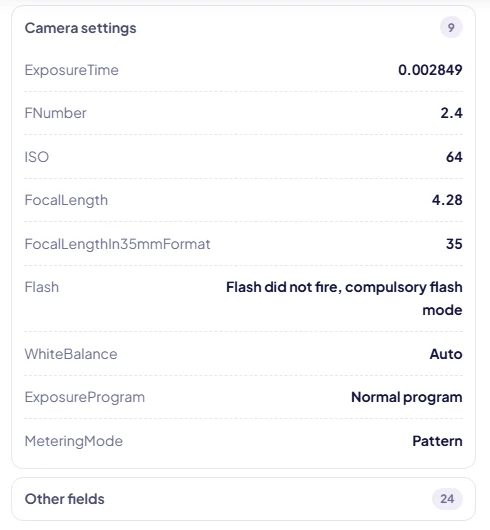
Make, model, lens, shutter speed, aperture, ISO, focal length, flash, white balance, metering mode. This is the part photographers care about. Looking at the Nikon file, you can see it was shot at 1/160 s, f/6.3 and ISO 100 with a 35 mm lens, without flash. If you're learning photography, reading the settings from photos you like is one of the quickest ways to understand how they were made.
Dates and times
Usually several: when the photo was taken, when the file was last changed, and on newer devices the time zone offset. They don't always agree. The Nikon photo was taken on 24 May 2013 and last saved by Lightroom on 11 June, 18 days later. Photo apps use the "taken" date to sort your library, which is why a photo with a wrong camera clock lands in the wrong year.
Orientation
A single number that tells viewers how to rotate the picture. Phones often store the image sideways and set this tag rather than rotating the pixels. The iPhone photo we tested is stored on its side with orientation 6. Remove that tag carelessly and the photo appears sideways in some apps, which is why the metadata remover keeps it by default.
Location
Latitude, longitude and often altitude, the GPS time and the direction the camera faced. Phones add it when location access is on for the camera, which is the default on most. The iPhone file's coordinates were precise to about 18 metres and pointed at the same block as the address in the photo's title. The guide on how to remove location from a photo covers this group in detail.
Identity
Owner or artist name, copyright, and on many dedicated cameras the body serial number. Phones usually record the model rather than a serial number. A serial number doesn't name you by itself, but it links every photo taken with that camera, including ones you posted under a different name.
Software and editing history
The firmware or app version, the editing program, and in XMP sometimes a list of every adjustment made. Harmless for most people, revealing for some: it shows a photo was edited and with what.
The embedded thumbnail
Many cameras store a small preview image inside the EXIF block so file browsers can show it quickly. The iPhone photo had one. Some editing software used to update the main picture but leave this preview untouched, which meant a cropped photo could still contain a small copy of the uncropped original. Modern editors generally handle it, but it's one more reason to clean files rather than trust that cropping removed something.
How to view EXIF data
- In your browser: add the photo to the metadata remover. It lists every field it finds, grouped, without uploading the file. JPG, PNG and WebP are supported.
- Windows: right-click the file, Properties, Details. Camera settings, dates and GPS are all listed.
- Mac: open the photo in Preview and choose Tools > Show Inspector. The Exif and GPS tabs show the details.
- iPhone: in Photos, swipe up on a photo. You'll see the camera, lens, settings, file size and a map if there's a location.
- Android: in Google Photos, swipe up on a photo for the camera details and location.
The built-in views show a curated selection. A full reader shows everything, which is the only way to be sure what a file would give away.
When EXIF data is useful
- Organising photos. Every photo library sorts by the "taken" date and builds maps from GPS. Strip everything and your library loses both.
- Learning. Settings tell you how a picture was made.
- Proving authorship. Copyright and artist fields travel with the file. They're easy to remove, so they're not proof on their own, but they help honest re-users credit you.
- Colour. Strictly separate from EXIF, the colour profile (ICC) tells apps how to show the colours correctly. The metadata remover keeps it by default, because removing it can make photos from some cameras look slightly flat or oversaturated.
When to remove it
Keep metadata in your own archive. Remove it from copies that go to strangers. That's the simple rule most people settle on. In practice that means:
- Photos for online listings, forums, dating profiles and public posts.
- Photos of your home, your children or anything you'd rather not tie to an address.
- Images on your own website, which serves the file exactly as you uploaded it.
- Files sent to people you don't know well, especially as documents or email attachments, which keep everything.
The metadata remover strips EXIF, XMP and IPTC without re-compressing the picture. Its two options, keep rotation and keep colour profile, are on by default because they preserve how the photo looks. Our other tools, such as the image compressor and the upscaler, also produce files with no metadata, but they re-encode the image; we checked, and the compressor's output of our iPhone test photo had no camera data left at all. Use them when you want a smaller or edited file anyway, and the metadata remover when you want the original picture, unchanged.
Myths worth dropping
- "Screenshots have my location." No. A screenshot is a new image made by the phone and normally carries no GPS. It can still show a location in its content.
- "Converting to PNG removes metadata." Not reliably. PNG can store EXIF and text fields, and some converters copy them over.
- "Removing metadata lowers quality." Only if the tool re-encodes the image. A lossless remover doesn't touch the picture.
- "Social networks keep my location private, so it's fine." They hide it from other users, but they receive the original file. And anywhere else you send the same file may not hide anything.
Frequently asked questions
What is EXIF data in simple terms?
It's a block of text-like information stored inside a photo file: which camera took it, with which settings, when, and often where. The name stands for Exchangeable Image File Format, a standard first published in 1995 that almost every camera and phone follows.
How can I see the EXIF data of a photo?
Add the photo to the metadata remover, which lists every field it finds without uploading the file. You can also use Properties > Details on Windows, Tools > Show Inspector in Preview on a Mac, or swipe up on the photo in Photos (iPhone) or Google Photos (Android).
Does EXIF data include my location?
If location was turned on for the camera when you took the photo, yes: GPS coordinates precise to a street or a building, often with altitude and the direction the camera faced. Most phones turn it on by default.
Can EXIF data identify me?
It can point to you. A camera's serial number links photos taken with the same camera, some files carry the owner's name or a copyright line, and GPS coordinates can lead to your home. Phones usually record the model rather than a serial number.
Is EXIF data removed when I post online?
Large social networks generally strip it from the photos they publish. Email, cloud links, many forums and files sent as documents keep it. If it matters, remove it yourself before sharing.
Does removing EXIF data change the picture?
Not with a lossless tool. The metadata remover deletes the metadata blocks and leaves the image data byte for byte the same; in our tests every pixel was identical. It keeps the rotation tag by default so photos don't appear sideways.